Better resend to plant conveyor
Easily resend a particular garment or set of garments to the QuickSort or MetalProgetti conveyor if they were not successfully received by the conveyor.
Keep track of all new updates to CleanCloud
Easily resend a particular garment or set of garments to the QuickSort or MetalProgetti conveyor if they were not successfully received by the conveyor.
You will now have the ability to copy/link over inventory items when adding in a new store with us via the Multi Store tool! Just make sure you have the 'copy products' or 'link products' option enabled when adding in your new store. For further information regarding the Multi Store tool, please click on this link: https://cleansupport.zendesk.com/hc/en-us/articles/360024191611-How-to-add-a-new-store-to-your-account
If you have the Speed Queen integration in your CleanCloud account, you'll be able to see the Speed Queen payment method in Metrics.
The CleanCloud App's new version (ver6.8) is live on both the App Store and Google Play - make sure you update the app and inform your customers to update for the latest features.
New features include:
You will now have the ability to link up Speed Queen or Huebsch to your CleanCloud account. This will allow your customers to be able to pay for their orders via the Speed Queen or Huebsch app. To get this configured, simply just go to Settings > Admin > Payments.
Please note: This is only available for US customers.
If you are subscribed to our Reviews module, you are now able to set automated marketing campaigns that send out at a pre-set frequency.
You can determine:
If you would like to take advantage of this great feature and Reviews as well, you can always reach out to the Customer Success Team.
To improve the usability of the plant, we have now made it possible to multi-select, when:
We've also fixed the header, so it will be easier to use.
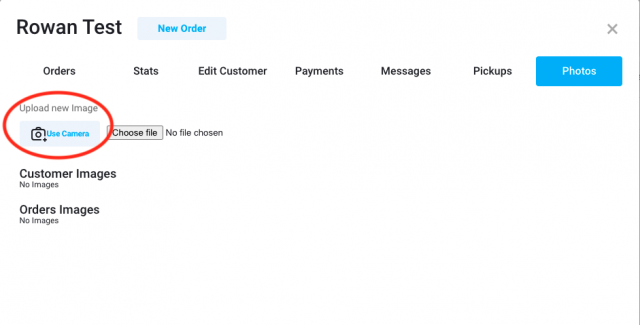
You will now have the ability to use your PC/Mac device camera when adding photos from the New Order page. To have this facility, you just need to go to Settings > Printers > Web Camera, and ensure you have the photo source set to 'Web Camera'.
Now while racking, if the order is not on the Ready page, to speed up Quick racking, the order will move from the Cleaning page to the Ready page. This will notify the customer as well, that the order is now ready for collection.
If the order is neither on the Cleaning or Ready pages, then it will bring the order to the Ready page and play sound to notify that order was sent there. This is so an order that was accidentally marked as completed can be quickly brought back to the Ready page.
SpyderWash has now been integrated with CleanCloud. This allows your customers to pay for their orders in CleanCloud using their SpyderWash cards.
Learn more here: https://cleancloudapp.com/blog/cleancloud-and-spyderwash-announce-payments-integration